
Server Transfer Slots Increase from 40 to 50
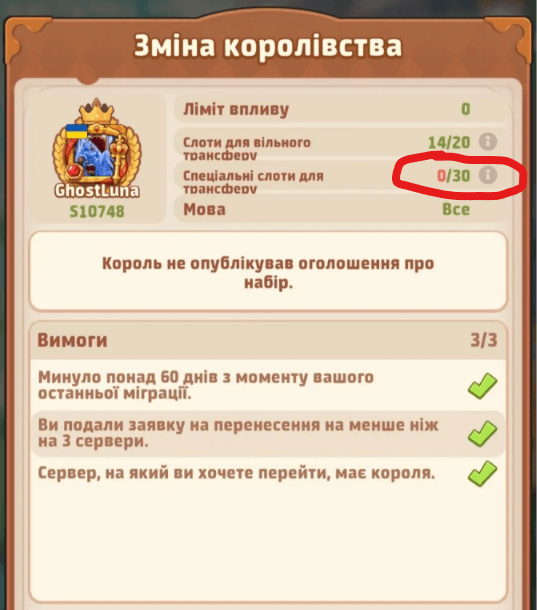
Top Heroes special server transfer slots have increased from 20 to 30. Combined with 20 free transfer slots, that brings total capacity from 40 to 50 — ten more places for players planning a server move.
What Changed?
The increase is in the special transfer category. The free-slot limit stays at 20; the special-slot limit is now 30. Total capacity rises by 25%, calculated as 10 extra slots divided by the previous 40.
| Slot type | Before | Now |
|---|---|---|
| Free transfer slots | 20 | 20 |
| Special transfer slots | 20 | 30 |
| Total transfer capacity | 40 | 50 |
What the screenshot confirms
The player-shared server transfer (kingdom transfer) screen for S10748 shows 14/20 on the free transfer row and 0/30 on the special transfer row. The denominators confirm the displayed limits of 20 and 30. The previous 20-special-slot limit comes from the player report accompanying this screenshot.
These are capacity limits, not a guarantee that 50 places are available when you apply. Check your destination's live counters and in-game rules before committing to a move. This screenshot does not establish rollout timing for every server.
Planning an Alliance Move
Ten extra slots give groups more room to coordinate. A 45-player roster exceeds the old 40-slot total but fits within a 50-slot total on paper. Each player still needs an eligible slot type and must meet the destination's requirements; total capacity alone does not secure the move.
Confirm both slot categories
Ask destination leadership how many free and special places can accommodate your roster. Keep separate counts rather than treating all 50 slots as interchangeable.
Check each player’s eligibility
Review the live transfer screen for every account. More capacity does not, by itself, establish any change to eligibility, transfer costs, or approval rules.
Recheck before transferring
Confirm the destination’s current counters and coordinate your move with its leadership. A capacity limit is not a reserved place for your alliance.
The key numbers to plan around are now 20 free + 30 special = 50 total wherever your in-game screen displays these limits. Verify the destination first, then build your transfer roster.
Open Top Heroes Tools